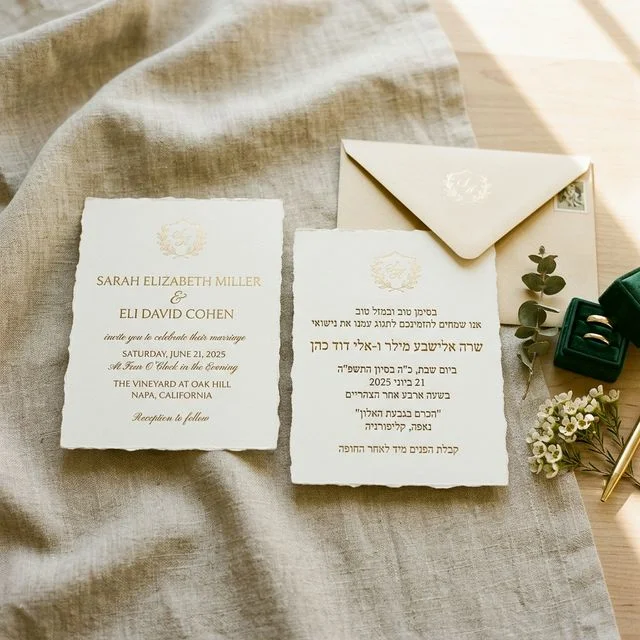
Quick answer: There are three ways to make a wedding website bilingual — build a separate site per language, print both languages on every page, or publish one site that switches language for each guest. The third is what most couples actually want: one URL to share, one set of content to keep updated, and a language menu that remembers each guest's choice. QuikRSVP's wedding website builder works that way — write your pages once, translate them into any of 70+ languages including Hebrew and Arabic with full right-to-left layout, and your RSVP form inherits the same languages. Here is how the three approaches compare, and what the setup involves.
Your wedding website is where guests go for everything: the schedule, the venue address, hotel options, the dress code, the RSVP. When part of your guest list can't comfortably read it, they don't get half the experience — they get a wall. They screenshot pages and forward them to relatives for translation, they call to ask what time the ceremony starts, or they quietly miss the details you spent weeks writing.
Roughly one in three weddings today crosses a language line somewhere in the guest list — couples from different countries, immigrant parents and locally-raised friends, family scattered across continents. For those weddings, a bilingual website isn't decoration. It's the difference between guests who show up informed and guests who feel like an afterthought.
What "Bilingual" Actually Needs to Cover
Here's the trap: most couples think of the hero page — the names, the date, a welcome line. But guests don't struggle with your names. They struggle with everything below the fold:
- The schedule — event names, times, dress codes, and descriptions ("cocktails at sunset on the garden terrace" helps nobody who can't read it)
- Travel information — how to get there, where to stay, which hotel gives your wedding discount
- Your story and welcome message — the emotional heart of the site
- The FAQ — parking, kids, gifts, weather, all the questions guests actually have
- Navigation and section titles — "Travel & Accommodations" in English is noise to a Hebrew-only reader
- The RSVP form — the single most important action on the site
A genuinely bilingual wedding website translates all of it — and keeps a few things deliberately untranslated: venue names and street addresses need to stay exactly as written, or guests can't match them against Google Maps, Waze, and street signs.
The 3 Ways to Build One (And What Each Costs You)
Option 1: Two separate websites
Build the site twice — once per language — and send different links to different guests. It works, but you maintain every change twice (weddings change: times shift, hotels fill up), guests forward the "wrong" link to each other, and mixed households have to choose. This is the approach most couples start with and most couples regret by month three.
Option 2: Cram both languages onto every page
English on top, Spanish underneath, on every section. Familiar from printed invitations, but on a website it doubles the scrolling, halves the elegance, and breaks completely with three languages or with right-to-left scripts like Hebrew — you can't gracefully stack an RTL paragraph under an LTR one on a phone screen.
Option 3: One website with a language switcher
The way actual multilingual websites work: one link, one set of content, and a language menu in the navigation. Each guest reads the same site in their own language. This is the right architecture — the only question is how the translations get made and maintained. Doing it by hand in a generic website builder means paying for translation and re-doing it on every edit. Doing it with built-in AI translation means clicking a button after each change.
What about The Knot, Zola, and Joy?
The Knot and Zola wedding websites are effectively English-only. Joy translates its own interface labels into a limited set of languages — but the content you write (your story, schedule details, travel notes) stays in whatever language you wrote it. If your guests need your actual content in their language, those platforms leave you with Option 1 or 2 anyway.
Step-by-Step: A Multilingual Wedding Website in ~10 Minutes
QuikRSVP's wedding website builder has a dedicated Languages step that does Option 3 for you. Here's the whole flow:
Build your site in your language
Pick one of six templates, add your welcome message, story, schedule, travel info, and FAQ — in whichever language you're most comfortable writing. Write it once; this stays your single source of truth.
Add your guests' languages
In the builder's Languages step, switch on "Offer my website in multiple languages" and pick up to 3 more languages from a list of 70+ — Spanish, French, Hebrew, Arabic, Russian, Portuguese, and far beyond.
Translate, review, adjust
Click "Translate now" and AI translates every section in about half a minute per language. A Review editor shows each translated field so you (or a native-speaker relative) can fine-tune phrasing — your edits stick even if you re-translate later after content changes.
Publish one link for everyone
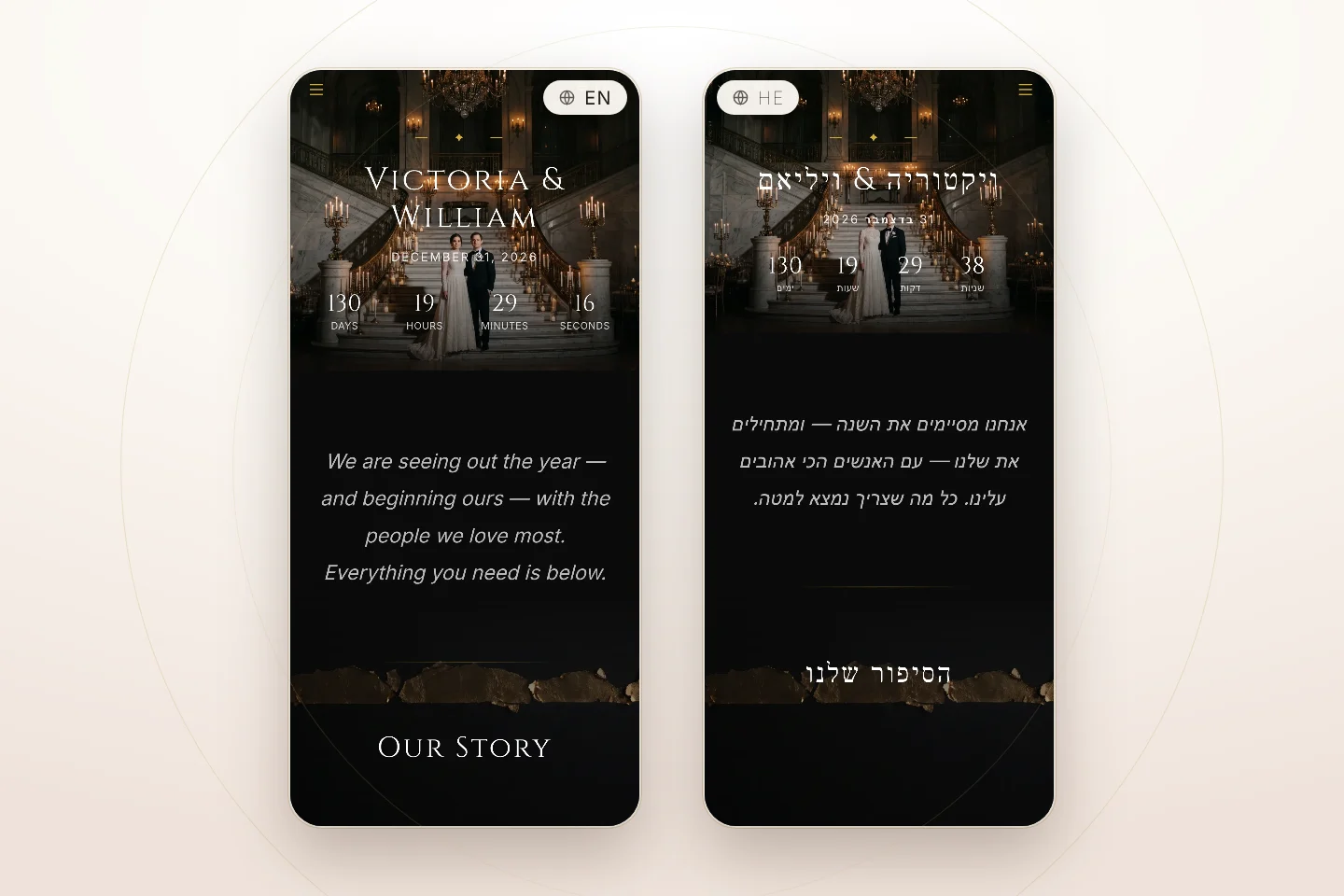
Guests get a single URL (quikrsvp.com/w/your-names). The site opens in each guest's device language automatically, and an elegant globe menu in the navigation lets anyone switch. Their choice even follows them into the RSVP form.
Three details worth knowing, because they're the ones that break in DIY translations:
- Names are transliterated, not translated. Hebrew שרה becomes "Sarah" for English readers — phonetic, never a dictionary translation of the name's meaning.
- Venues and addresses stay untouched in every language, so navigation links and street signs keep matching.
- Right-to-left just works. Switch to Hebrew or Arabic and the entire site flips — navigation, headings, schedule, countdown — not just the paragraphs.
Which Languages Should You Offer?
Resist the urge to add every language anyone in your family speaks. The right question is: who can't comfortably read the site's main language? Most bilingual weddings need exactly one extra language; trilingual families (say, a French-Israeli couple marrying in the US) need two. Beyond three, you're maintaining translations nobody opens.
A practical way to decide: go through your guest list and mark everyone who would text you a question rather than read an English page. If a language group has more than a handful of people — especially grandparents and older relatives — it earns a spot. Then ask one native speaker from each group to skim the Review editor before you publish; ten minutes of a cousin's time catches the phrasing AI can't know, like which register your family uses for formal invitations.
And match the invitation to the site: if you're sending bilingual invitations over WhatsApp, the website link inside them can carry a language hint, so Hebrew-speaking guests land directly on the Hebrew site while English speakers land on the English one — same link, different experience.
One Website. Every Guest Included.
Build your wedding website once, add your guests' languages, and let AI do the heavy lifting — automatic language detection, full RTL support, and an RSVP that speaks the same language as your site.
Free with Event Pro Signature — $30 one-time for everyone else.