Quick answer: Choose Zola if you want an all-in-one US wedding platform with a traditional retail registry and vendor tools built in. Choose QuikRSVP if your guest list crosses languages or borders — it translates one RSVP form into any of 70+ languages with full right-to-left layout, sends invitations by WhatsApp, and pays cash gifts directly to your bank at 2.5% plus Stripe rather than as store credit. The other practical difference is how guests get in: Zola matches each guest against your list by name, while QuikRSVP's form is open by default, with invite-only gating available if you want it. Here is the honest comparison, feature by feature.
Zola has earned its reputation as an all-in-one wedding planning platform. It handles invitations, registries, guest lists, and vendor coordination under one roof. For many couples, that convenience is exactly what they need.
But "all-in-one" comes with trade-offs. If you have international guests, want full control over your gifts, or need a genuinely multilingual experience, Zola's approach may not be the best fit. QuikRSVP was built with these exact scenarios in mind.
This isn't a hit piece. Both platforms solve real problems. This guide helps you figure out which one solves yours.
What We'll Compare
Reading is one thing — trying is another. The phone on the rightbelow is a live, working RSVP: tap the invite exactly like your guests would.
QuikRSVP vs Zola: Feature Comparison
| Feature | QuikRSVP | Zola |
|---|---|---|
| RSVP method | Open link, fill form, done | Guest must type name to find themselves |
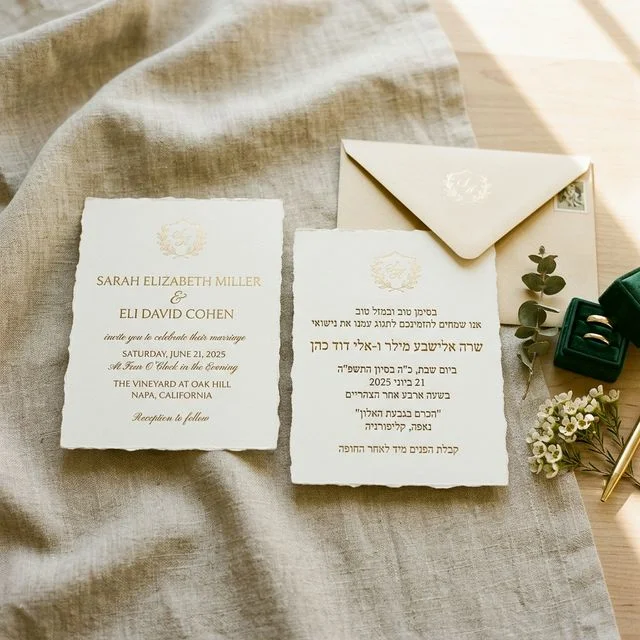
| Multilingual forms | True multilingual — auto-detects guest language, toggle for others | Single language; bilingual requires manually duplicating all content |
| Non-Latin scripts (Hebrew, Arabic) | Full support with RTL layout | Special characters not supported |
| Gift registry | Cash gifts via Stripe — named items or general fund | Physical product registry + cash funds via Venmo/credit card |
| Gift fulfillment | Host receives cash, buys what they want | Zola ships products to couple |
| Custom RSVP questions | Unlimited — text, select, radio, checkbox, conditional visibility | Unlimited custom questions |
| Conditional fields | Show different questions for attending vs. not attending | Not available |
| Wedding website | Full site — multi-page or single scroll, AI content generation & translation | Full site — templates with limited customization |
| WhatsApp invites | Bulk send with personalized links | Not available |
| QR code check-in | Yes (Event Pro) | Not available |
| Guest list export | CSV / Excel | Yes |
| Marketing to guests | Never sold or shared; no gift-purchase pressure | Zola may email guests with gift reminders |
| Seating chart | Yes — manual or auto-assign with smart rules (group by relationship, dietary needs, etc.). Web-based, included with Event Pro. | Yes — drag-and-drop only, iOS app only, free for 15 guests then requires Premium |
| Vendor marketplace | No | Yes |
| Pricing | Free (25 responses) or $45 one-time per form | Free (monetized through registry commissions) |
The RSVP Experience: Two Very Different Approaches
Zola: Name-Based Lookup
When your guest visits your Zola wedding website to RSVP, they're asked to type their name. The system searches for a match against the guest list you entered. If found, they can proceed. If not, they see an error.
This approach offers privacy — only invited guests can RSVP. But it creates friction. According to Zola's own FAQ, here's what can go wrong:
- Name mismatch: If a guest goes by "Mike" but you entered "Michael," they'll get an error. Same for typos, middle names, or hyphenated last names.
- One name at a time: Searching for "Mike and Sarah" fails — guests must search individually.
- Lockout after failed attempts: Too many wrong tries locks the guest out for 15-20 minutes.
- Children need full names: Every guest, including kids, must have a first and last name in the system to RSVP.
These aren't edge cases. This is common enough that it's trending on TikTok and discussed extensively on WeddingWire forums.
QuikRSVP: Open Link, Fill Form
QuikRSVP takes a simpler approach. You share a link. Your guest opens it. They type their name, select their attendance, answer any custom questions you've set up, and submit. That's it.
There's no name lookup, no matching algorithm, no lockouts. The form works instantly for every guest — whether they go by a nickname, have a hyphenated name, or aren't tech-savvy.
Trade-off: Since the link is open, technically anyone with it could submit a response. In practice, this is a non-issue — you share RSVP links privately via WhatsApp, email, or printed QR codes, not publicly. And you can always review and manage responses from your dashboard.
Multilingual Support: The Biggest Difference
If all your guests speak English, both platforms work fine. If they don't, the difference is night and day.
Zola's Approach
According to Zola's FAQ on translations, they don't offer automatic translation. Their suggested workaround: add every section twice — once in English, once in another language. The result is a long page with both languages stacked on top of each other.
There are additional limitations:
- Buttons and system UI elements remain in English regardless
- Special characters are not supported — meaning languages like Hebrew, Arabic, Chinese, and many accented European languages won't display correctly
- Character limits on fields make fitting two languages even harder
QuikRSVP's Approach
QuikRSVP was built for multilingual weddings from the ground up. Here's how it works:
- The host selects which languages to enable when building the form.
- The form auto-detects the guest's browser language and displays in that language by default.
- Guests can toggle between languages using language buttons at the top of the form — switching the entire form (labels, buttons, everything) instantly.
This means a wedding with Hebrew-speaking family in Israel and English-speaking friends in the US uses one form, one link. Each guest sees it in their language automatically. No duplicated sections, no English-only buttons, no broken characters.
Full RTL (right-to-left) support is included for Hebrew and Arabic, with proper layout mirroring — not just text direction.
Wedding Websites Too
The same multilingual approach extends to QuikRSVP's wedding websites. Hosts can write content in one language and use AI to translate, refine, and enhance it in other languages. Or write in each language manually. Either way, guests get a native-feeling experience in their language — not a page with two languages awkwardly stacked together.
Gifts & Cash Funds: Products vs. Cash Freedom
This is where Zola and QuikRSVP take fundamentally different approaches — and both have merit.
Zola: Traditional Registry + Cash Funds
Zola operates a full product registry. Guests browse items, purchase them through Zola, and Zola ships products to the couple. They also offer cash funds where guests contribute via credit card (with processing fees) or Venmo.
The advantages: guests see physical items, it feels traditional, and it integrates with Zola's wedding website.
The downsides, based on user reports across WeddingWire and the Better Business Bureau:
- Shipping delays and inventory issues: Items listed as available but actually out of stock, with fulfillment taking weeks
- Product quality concerns: Reports of receiving damaged items or products that don't match what was advertised
- Price markups: Some users report Zola's prices being higher than the same items at other retailers
- Cash fund transfer delays: Multiple BBB complaints about difficulty withdrawing cash gifts, with identity verification loops and funds held for extended periods
To be fair: many couples have great experiences with Zola's registry. But when a physical product middleman is involved, these kinds of issues are inherent to the model.
QuikRSVP: Cash Gifts, No Middleman
QuikRSVP sidesteps the entire product registry model. Instead, couples create gift items that guests contribute cash toward — a honeymoon fund, a kitchen renovation, a down payment, or anything else meaningful to them.
Guests don't buy a specific blender from a catalog. They contribute toward "Our Dream Kitchen" and the couple uses the money however they want — maybe they buy that blender at the best price they can find, or maybe they decide they'd rather put it toward something else entirely.
Payments are processed through Stripe — the same payment infrastructure used by Amazon, Shopify, and millions of businesses worldwide. The money goes to the host's own account as real cash, never store credit — each gift is sent on about a week after it arrives, a short security hold, and then follows Stripe's standard payout schedule to the bank.
Why this matters: No inventory means no shipping delays, no damaged products, no markups, and no awkward returns. Guests contribute toward something meaningful, and the couple gets complete flexibility with the funds. It's a modern take on gift-giving that avoids the logistical headaches of a traditional product registry.
Wedding Websites
Zola
Zola offers hundreds of website templates that are visually polished. You can customize content, add photos, and include sections for your story, schedule, venue, and registry. Custom domains are available for $14.95.
The limitations: you can't change fonts or colors beyond what each template allows, and bilingual websites require the manual duplication method described above. Buttons and navigation elements stay in English.
QuikRSVP
QuikRSVP's wedding websites offer the same core sections — about the couple, schedule, venue, photos, registry, and RSVP — with the choice of multi-page or single-scroll layout.
Where it differs:
- AI content generation: Not sure what to write? AI can generate section content for you based on your event details.
- AI translation & refinement: Write in one language, let AI translate to others. Or refine and enhance your text in any language. The entire site — not just the content, but navigation and buttons too — works in every language you enable.
- True bilingual sites: Guests see the site in their language with a toggle to switch, rather than seeing both languages stacked on every page.
Sharing & Distribution
Zola generates a website URL that you share with guests. You can email invitations through their platform or copy the link to share manually.
QuikRSVP gives you a shareable link too — but goes further with built-in distribution tools:
- WhatsApp bulk sending: Send personalized invitations with unique RSVP links to your entire guest list through WhatsApp — the most popular messaging app worldwide. This is critical for international guests or communities where WhatsApp is the primary communication channel.
- QR codes: Generate QR codes to print on physical invitations, table cards, or display at the venue for day-of check-in.
- SMS, email, or any channel: Since it's just a link, it works everywhere — text message, email, social media DM, or even a physical card.
An important privacy note: QuikRSVP never sells or shares your guest list, and never sends your guests gift-purchase reminders. If we write to them at all it is about QuikRSVP itself, with one-click unsubscribe. Some Zola users have reported receiving marketing emails from Zola directed at their guests, pushing gift purchases.
Pricing: Free vs. Free (With Different Trade-offs)
Both platforms offer free tiers, but they're funded very differently.
Zola
- Wedding website: Free
- RSVP tracking: Free
- Guest list management: Free
- Custom domain: $14.95
- Registry: Free to create, but Zola earns commission on purchases made through their platform
Zola's free tier is genuinely generous. The trade-off is that they monetize through their registry and marketplace — which is why registry items may carry a markup and why you might see promotional emails to guests encouraging purchases.
QuikRSVP
- RSVP form (up to 25 responses): Free
- Event Pro (up to 150 responses, QR check-in, advanced features): $45 one-time per form
- No monthly fees, no per-guest charges, no subscriptions
QuikRSVP charges for the product directly. Its registry fee is low and transparent, there's no marketplace upsell, and no commission on what your guests buy — so no reason to pressure them into buying anything.
The pricing philosophy: When a product is free, you're often the product. Zola's free tier is funded by registry commissions and marketplace revenue. QuikRSVP's free tier is a genuine free offering with a clear, one-time upgrade path. Neither approach is wrong — but it's worth understanding what you're trading.
Which Should You Choose?
Choose Zola if...
You want an all-in-one platform with a traditional product registry, vendor marketplace, and seating charts. You're planning a primarily English-speaking wedding and your guests are comfortable with name-based RSVP lookup. Zola does a lot of things well under one roof.
Choose QuikRSVP if...
You have guests who speak different languages, want a frictionless RSVP experience, prefer cash gifts over a product registry, or want to share invitations via WhatsApp. QuikRSVP is purpose-built for modern, multicultural, and international weddings.
You can use both
Some couples use Zola for vendor coordination and planning tools, and QuikRSVP for RSVPs and gift collection. The platforms don't conflict — use whichever combination works best for your situation.
Zola and QuikRSVP aren't your only options. If a design-first card service is also on your shortlist, our guide to Paperless Post alternatives compares the most popular digital-invitation platforms side by side.
Frequently Asked Questions
Is QuikRSVP really free?
Yes. The free tier covers up to 25 responses per form — enough for smaller weddings or testing. For larger events, Event Pro is a one-time $45 per form for up to 150 responses, QR check-in, and advanced features. No monthly fees, no per-guest charges.
Can I use QuikRSVP without building a wedding website?
Absolutely. The RSVP form works as a standalone link you can share anywhere — WhatsApp, SMS, email, or QR code. The wedding website is a separate, optional feature.
Does Zola really not support special characters?
That's what Zola's own FAQ states. This means languages that use non-Latin scripts (Hebrew, Arabic, Chinese, Japanese, Korean) or heavy accentation may not display correctly on Zola wedding websites.
Can random people RSVP on QuikRSVP?
Technically, anyone with the link can submit. In practice, this isn't a real concern — RSVP links are shared privately with your guest list, not posted publicly. You can always review and manage all responses from your dashboard.
How do cash gifts work on QuikRSVP?
You create gift items (e.g., "Honeymoon Fund," "Our First Home") and guests contribute any amount toward them. They can also send general cash gifts. All payments go through Stripe directly to your account — QuikRSVP never holds your money. You decide what to actually spend it on.
Can I switch from Zola to QuikRSVP mid-planning?
Yes. Since QuikRSVP's RSVP form is just a link, you can start using it anytime — even alongside Zola. And if you've already collected some RSVPs, you don't lose them: open the Responses tab, click Import, and upload a CSV — QuikRSVP brings them in as real responses, ready for seating, check-in, and stats. Import works on every plan, and your imported guests are always fully visible; we never hide the guest list you bring.
See the difference for yourself
Build a free RSVP form in 2 minutes. No account needed, no credit card required. Share it with your guests however you want.
Start Building Free